
This is my third post on Got. The first one was a First Look, followed by Trying Out, and you have probably guessed that this one is about using Got in real world projects.
Why use Got?
I’m probably going to repeat myself from previous posts, so apologies in advance.
Firstly, Git is ubiquitous. I think any programmer, even one working on their own like me, should be able to deal with Git repositories. The problem is, I don’t really like Git. I tried it back in ~2016 when it became obvious I need to use a VCS, but Git didn’t click with me. I tried Fossil, Git, Mercurial, Darcs and Mercurial was the one I liked best. so, I’ve continued to use it ever since. On the rare occasions when I’ve been forced to use Git, it’s got the job done, but at no point have I ever thought, “the time is right to switch to Git.” Never, sorry.
I came across Got whilst browsing salsa.debian.org. When I found out is was an OpenBSD project, I became more interested. Any self respecting geek knows that OpenBSD are one of the biggest projects to continue to use CVS. Well, their own rewrite of GNU CVS. But I think we all know that a distributed project like Linux, or a BSD would be better off using a distributed VCS. And I think we all also know, that over the last twenty years, the distributed VCS’s have proven themselves.
So Got is an OpenBSD implementation of Git designed for their workflows. See here for the project goals. The “features” that appealed most to me were
Strong built-in support for a centralized repository model
and
Keep things easy for developers who don’t need branches.
The centralized repo model is something that clicks with me. With Got, you have to have repo’s and worktrees in different places:
/home/simon/repo/got/all-my-repositories/home/simon/repo/tree/all-my-working-directoriesYou cannot checkout a worktree into a repository. With this hybrid centralized/distributed model all your repositories can live in one directory, and your worktrees can be scattered all over your hard drive. As long as you checkin worktree changes, you can delete the worktree when you no longer need it. It is after all, just a worktree, not your repository!
The second goal of keeping things easy for people who don’t need branches also appeals to me. When I’m starting a new project, I don’t branch at all. Everything is done on the default branch. At the point where things seem stable, I’ll sometimes create a stable branch and from that point follow the stable / main branching strategy as described by Steve Losh. I’ve always thought that the idea of “feature” branches is unnecessary.
I look at it like this: you’ve got some work to do, so get on with it and do it. No need to create a temporary branch as it’s going to get merged back into the default branch anyway and then thrown away! If the work may take many iterations to get right, you can use the stage -p command in Got to interactively prepare the changes that you’re happy with. In Mercurial, I quite often use hg ci -i which works in a similar way.
Project 1: Miscellaneous Scripts
I wrote a post in 2023 about using RCS for versioning one off, ad-hoc scripts. But I was starting to hit the limit of RCS’s capablilities. Here are the problems I was having:
1. I have scripts all over the place that I need to somehow keep track of
2, Some scripts are used in multiple projects
Problem 1 means I need some other tool to keep track of all my RCS repositories. I’d always resisted having a central repo for unrelated items (i.e. not a project), but now suspected it might be an obvious solution to my problem.
Problem 2 mainly relates to my bottle.py projects. I have written, or modified, a number of modules that are used in most projects. Up until now my stupid method was to simply remember which project had the latest updates and copy the module from there to the new project. Ugh! Not good. A better approach was clearly needed…
So I thought this a perfect time to try out Got for something that actually mattered (to me). Normally, I’d use Mercurial, my VCS of choice, but there a few reasons I’m wanting to incorporate Got into my toolbox, as explained above.
Project 2: Static Website
For a project I’m currenly working on, I wanted to create a simple static website. Another opportunity to get my hands wet (or wetter) with Got.
So, how did it go?
The Scripts
Very simple. I created:
/home/simon/repo/simonh/simonh-scripts.gotThen cd’ing into the new directory and running:
got init .Next I import the scripts from a temporary directory where I put them all together:
got import ~/tmp/scriptsFinally:
got co . ~/code/scriptsAnd that’s it. Well nearly it. I’ll set up a repo on one of my servers to act as a backup. In the repo edit got.conf
remote "simonh" {
  server myserver.com
  protocol ssh
  repository "/home/simon/repo/got/simonh-scripts.got"
}
Now (after creating the repo on the server) I can backup my repo with:
got se simonhPerfect! Repo created, worktree created, everything backed up.
The website
This one was slightly different as I’m wanting two branches: main and stable. Plus, right now I have nothing to import. Let’s get to work.
I’ll create my (temporary) working directory:
mkdir ~/tmp/new-websiteInside that directory, create whatever files I need to be able to put them on my web server. As it happens, I only need index.html right now.
Let’s setup the local repo:
$ mkdir ~/repo/web/new-website
$ cd ~/repo/web/new-website
$ got init .
$ got im ~/tmp/new-website
$ got co . ~/web/new-website
$ rm -r ~/tmp/new-website
So I’ve now created my index.html which is good enough to upload to the live web server. The great thing about having a stable and a main branch is that I can work on the main branch and only merge changes into stable when they’re ready.
A Pleasant Surprise
At this point I have my index.html page that I want to put on the web server. I basically need to create a repo on the server and a worktree on the server.
The repo will live in a similar directory structure to my local machine:
/home/simon/repo/web/new-website.gotand the worktree will be checked out to
/var/www/new-websiteThe beautiful thing about this setup is that I can push changes from my local repo to my remote repo, then update the remote worktree (which was checked out from the stable branch)! Any half finished work is siloed in the “main” branch until integrated or merged into stable. When I add binary files (PNG’s, JPG’s, PDF’s etc), they also get sent to my server and the worktree will be updated to include them as well.
simon@myserver:~ [ssh] $ cd /var/www/new-website/
simon@myserver:/var/www/new-website [ssh] $ sudo got br
stable
simon@myserver:/var/www/new-website [ssh] $ sudo got up
Already up-to-date
If you’ve made changes but Got reports that you’re already up-to-date, when you’re not, you’ll probably have to merge or integrate the changes from the main branch to the stable:1
Just be careful that you haven’t added anything to your stable branch that shouldn’t be there. As you can see below, only index.html was updated, about.html and contact.html exist in the main branch, but haven’t been added to stable:
simon@myserver:/var/www/new-website [ssh] $ sudo got br
stable
simon@myserver:/var/www/new-website [ssh] $ sudo got ig main
U  index.html
Integrated refs/heads/main into refs/heads/stable
The final precautionary measure is to add an .htaccess file to the .got directory in the server worktree to prevent browsing:
simon@myserver:/var/www/new-website [ssh] $ cat .got/.htaccess
Require all denied
Not that there’s anything valuable there, just worth locking down anyway.
Conclusion
Both projects went well. I was a bit unclear when it comes to the differences between merging and integrating. It’s only the last year or two since I’ve been using anything more than the default / master / main branch. I even ended up checking the mailing list for an explanation of the Got integrate command (see here):
Have I got it right that it basically syncs the master branch with the
working branch? As in you checkout a new branch to, for example, add
a new feature or fix a bug and then want to sync the master with the changes?
Yes, that’s precisely it.
The Google AI bot states this:
A merge is a general term for combining changes between branches, while a reintegrate (specifically in Apache Subversion) is a specialized final merge that takes all unique changes from a completed feature branch and safely applies them back to its parent branch.
So it would appear that the main difference is not attempting to merge changes already applied. The keyword is “unique”. This will be very useful for syncing between main and stable branches I think.
I’ll continue to use Mercurial as my main VCS for Python stuff, and RCS when I’m working on a script until it’s complete. Then I’ll dump the script + the RCS folder into my Got repo.
Like the BSD people, there’s no rush or pressure to change anything right now. I’m very impressed with Got and I like it’s lack of features and commands:
$ got -h
usage: got [-hV] command [arg ...]
commands: init import clone fetch checkout update log diff blame tree status ref branch tag add remove patch revert commit send cherrypick backout rebase histedit integrate merge stage unstage cat info
Compare with the same command for Git:
$ git -h
usage: git [-v | --version] [-h | --help] [-C <path>] [-c <name>=<value>]
           [--exec-path[=<path>]] [--html-path] [--man-path] [--info-path]
           [-p | --paginate | -P | --no-pager] [--no-replace-objects] [--no-lazy-fetch]
           [--no-optional-locks] [--no-advice] [--bare] [--git-dir=<path>]
           [--work-tree=<path>] [--namespace=<name>] [--config-env=<name>=<envvar>]
           <command> [<args>]

These are common Git commands used in various situations:

start a working area (see also: git help tutorial)
   clone      Clone a repository into a new directory
   init       Create an empty Git repository or reinitialise an existing one

work on the current change (see also: git help everyday)
   add        Add file contents to the index
   mv         Move or rename a file, a directory, or a symlink
   restore    Restore working tree files
   rm         Remove files from the working tree and from the index

examine the history and state (see also: git help revisions)
   bisect     Use binary search to find the commit that introduced a bug
   diff       Show changes between commits, commit and working tree, etc
   grep       Print lines matching a pattern
   log        Show commit logs
   show       Show various types of objects
   status     Show the working tree status

grow, mark and tweak your common history
   backfill   Download missing objects in a partial clone
   branch     List, create, or delete branches
   commit     Record changes to the repository
   history    EXPERIMENTAL: Rewrite history
   merge      Join two or more development histories together
   rebase     Reapply commits on top of another base tip
   reset      Set `HEAD` or the index to a known state
   switch     Switch branches
   tag        Create, list, delete or verify tags

collaborate (see also: git help workflows)
   fetch      Download objects and refs from another repository
   pull       Fetch from and integrate with another repository or a local branch
   push       Update remote refs along with associated objects

'git help -a' and 'git help -g' list available subcommands and some
concept guides. See 'git help <command>' or 'git help <concept>'
to read about a specific subcommand or concept.
See 'git help git' for an overview of the system.
“Perfection is achieved, not when there is nothing more to add, but when there is nothing left to take away.” ― Antoine de Saint-Exupéry
Afterword
Oh, I nearly forgot. Actually I did forget and had to edit this post. Apparently, I made it into an OpenBSD presentation:
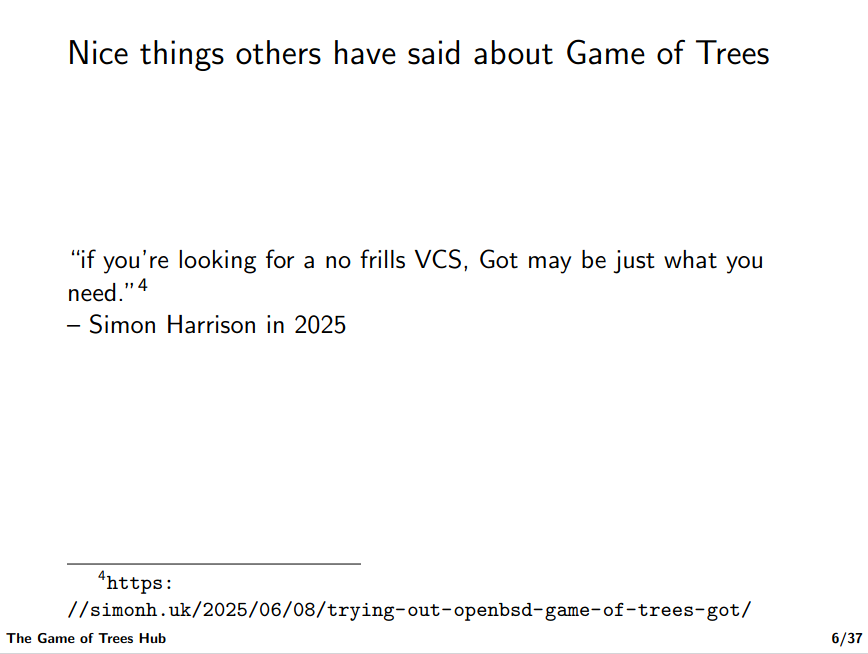
How about that, eh? I think I was looking something up about Got and happened to open the PDF and on page 6, there I am! I told the other half and she was quietly impressed (I could tell).
Footnotes
1 Still trying to get my head around local branches and remote branches.