
Mercurial doesn’t get a lot of love nowadays, but as I’ve been using it pretty much every day for about eight or nine years, I thought it might be time to remind The Internet that it still, very much is, a thing. One of the reasons I decided to write this post was this 2025 graph from rhodecode summarising developers preferred VCS
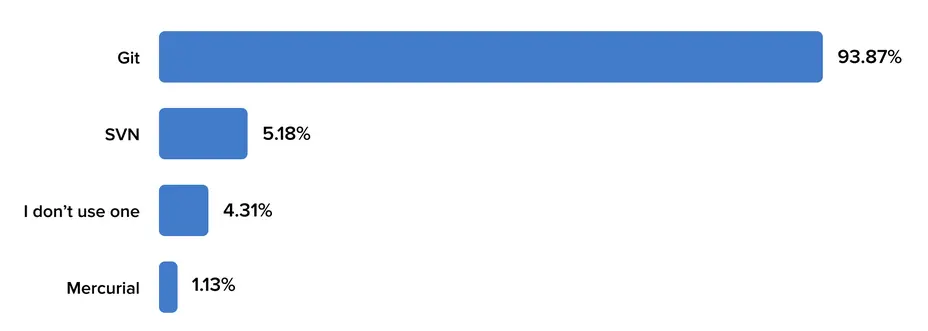
Sadly, there are nearly four times as many people using nothing as those using Mercurial! I’m not going to judge, or berate those people as I was one of them some years ago. I’ll probably write about that in another post. But if one person reads this post and at least tries Mercurial, I’ll be happy…
In this post, I’m using a throwaway, demo project and I’d advise anyone reading to do the same, until you’re comfortable with Mercurial concepts and commands. I’m also very lazy so if a command has a short option, I’ll be using that in the examples below.
Installation
See here
hg help
The most important command.
Mercurial Distributed SCM

list of commands:

Repository creation:

 clone         make a copy of an existing repository
 init          create a new repository in the given directory
 qclone        clone main and patch repository at same time

Remote repository management:

 incoming      show new changesets found in source
 outgoing      show changesets not found in the destination
 paths         show aliases for remote repositories
 pull          pull changes from the specified source
 push          push changes to the specified destination
 serve         start stand-alone webserver

Change creation:

 absorb        incorporate corrections into the stack of draft changesets
 commit        commit the specified files or all outstanding changes
:
Just run hg help <command> replacing <command> with an actual command. For example hg help init if you’ve forgotten what init does. The documentation is very good, I’ve found.
hg status
I’ve already added a few files for the purposes of this demo. We’ll run hg st to see what needs to be done.
You can run hg st to see the status of your reposistory
[simon@computer 09:45:37] ~/tmp/hg-demo
$ hg st
abort: no repository found in '/home/simon/tmp/hg-demo' (.hg not found)
In this case, Mercurial helpfully tells us that we don’t have a repository in this directory (yet). Let’s create one
hg init
[simon@computer 10:00:23] ~/tmp/hg-demo
$ hg init
If we forget that we’ve created a repo and try to create one again, Mercurial won’t allow that
[simon@computer 10:01:10] default ~/tmp/hg-demo
$ hg init
abort: repository . already exists
We’ll run hg st again to see where we are
[simon@computer 10:01:08] default ~/tmp/hg-demo
$ hg st
? bottle-sqlite-master/.gitignore
? bottle-sqlite-master/.travis.yml
? bottle-sqlite-master/LICENSE
? bottle-sqlite-master/README.rst
? bottle-sqlite-master/bottle_sqlite.py
? bottle-sqlite-master/setup.py
? bottle-sqlite-master/test.py
? bottle-sqlite-master/tox.ini
The ? simply means that the listed files / directories are currently unknown to Mercurial. We need to add them first
hg add
We can either add them individually, or add them all as a batch. I’m lazy so I’ll let Mercurial figure it out
$ hg add
adding bottle-sqlite-master/.gitignore
adding bottle-sqlite-master/.travis.yml
adding bottle-sqlite-master/LICENSE
adding bottle-sqlite-master/README.rst
adding bottle-sqlite-master/bottle_sqlite.py
adding bottle-sqlite-master/setup.py
adding bottle-sqlite-master/test.py
adding bottle-sqlite-master/tox.ini
Running hg st again lets us know that the files have been added, but not committed (or checked in, as I prefer) to our repo
[simon@computer 10:04:53] default ~/tmp/hg-demo
$ hg st
A bottle-sqlite-master/.gitignore
A bottle-sqlite-master/.travis.yml
A bottle-sqlite-master/LICENSE
A bottle-sqlite-master/README.rst
A bottle-sqlite-master/bottle_sqlite.py
A bottle-sqlite-master/setup.py
A bottle-sqlite-master/test.py
A bottle-sqlite-master/tox.ini
hg ci
Running hg ci will open up our default editor and let us write a commit message
 GNU nano 9.0          /tmp/hg-editor-rw5uklht.commit.hg.txt *          I

Add bottle-sqlite files

HG: Enter commit message.  Lines beginning with 'HG:' are removed.
HG: Leave message empty to abort commit.
HG: --
HG: user: Simon Harrison <simon@simonh.uk>
HG: branch 'default'
HG: added bottle-sqlite-master/.gitignore
HG: added bottle-sqlite-master/.travis.yml
HG: added bottle-sqlite-master/LICENSE
HG: added bottle-sqlite-master/README.rst
HG: added bottle-sqlite-master/bottle_sqlite.py
HG: added bottle-sqlite-master/setup.py
HG: added bottle-sqlite-master/test.py
HG: added bottle-sqlite-master/tox.ini
If we run hg ci again when nothing has changed we get
[simon@computer 10:19:55] default ~/tmp/hg-demo
$ hg ci
nothing changed
We can avoid the editor by passing -m to Mercurial
[simon@computer 10:19:55] default ~/tmp/hg-demo
$ hg ci -m "I changed something, somewhere"
hg log
At any time, we can see what chages we’ve committed to our repo
[simon@computer 10:07:45] default ~/tmp/hg-demo
$ hg log
changeset:   0:3f082894d145
tag:         tip
user:        Simon Harrison <simon@simonh.uk>
date:        Mon May 25 10:07:32 2026 +0100
summary:     Add bottle-sqlite files
As you can see, I’ve got one changeset. They say it’s always good to have a README, so let’s add one of them
[simon@computer 10:22:46] default ~/tmp/hg-demo
$ hg st
? README
We’ll add our new file specifically this time
[simon@computer 10:26:03] default ~/tmp/hg-demo
$ hg add README
[simon@computer 10:26:51] default ~/tmp/hg-demo
$ hg st
A README
And check it in with a short log message
[simon@computer 10:28:07] default ~/tmp/hg-demo
$ hg ci -m "Add README"
hg log -p
If we want to know what the actual changes were in a commit, we can pass the -p for patch
[simon@computer 10:28:31] default ~/tmp/hg-demo
$ hg log -p -r tip
changeset:   1:f45ecf76aaf0
tag:         tip
user:        Simon Harrison <simon@simonh.uk>
date:        Mon May 25 10:28:17 2026 +0100
summary:     Add README

diff -r 3f082894d145 -r f45ecf76aaf0 README
--- /dev/null   Thu Jan 01 00:00:00 1970 +0000
+++ b/README    Mon May 25 10:28:17 2026 +0100
@@ -0,0 +1,1 @@
+This is just a test repo for a blog post.
hg clean
What if you’ve added a file (or files) to your working directory, but realise you don’t want them in there, actually? Look at this. A random Perl script is in our project!
[simon@computer 10:43:24] default ~/tmp/hg-demo
$ hg st
? first.pl
How did that get in here? Of course, we could just delete it using the shell or a file manager, but Mercurial has a useful command clean to get rid of such things
[simon@computer 10:43:31] default ~/tmp/hg-demo
$ hg clean
permanently delete 1 unknown files? (yN) y
[simon@computer 10:43:53] default ~/tmp/hg-demo
Let’s check it really has gone
$ ll
total 20K
drwxrwxr-x 4 simon simon 4.0K 2026-05-25 10:43 .
drwxrwxrwx 8 simon simon 4.0K 2026-05-25 09:58 ..
drwxrwxr-x 2 simon simon 4.0K 2020-10-03 16:27 bottle-sqlite-master
drwxrwxr-x 5 simon simon 4.0K 2026-05-25 10:56 .hg
-rw-rw-r-- 1 simon simon   42 2026-05-25 10:21 README
This can come in very useful. I quite often pip install to a folder in my working directory. Except this time, I forget to install to lib/pip
[simon@computer 11:04:00] default ~/tmp/hg-demo
$ pip3 install -t . openpyxl
Collecting openpyxl
  Using cached openpyxl-3.1.5-py2.py3-none-any.whl.metadata (2.5 kB)
Collecting et-xmlfile (from openpyxl)
  Using cached et_xmlfile-2.0.0-py3-none-any.whl.metadata (2.7 kB)
Using cached openpyxl-3.1.5-py2.py3-none-any.whl (250 kB)
Using cached et_xmlfile-2.0.0-py3-none-any.whl (18 kB)
Installing collected packages: et-xmlfile, openpyxl
Successfully installed et-xmlfile-2.0.0 openpyxl-3.1.5
Running hg st shows that I made a boo boo.
? et_xmlfile-2.0.0.dist-info/AUTHORS.txt
? et_xmlfile-2.0.0.dist-info/INSTALLER
? et_xmlfile-2.0.0.dist-info/LICENCE.python
? et_xmlfile-2.0.0.dist-info/LICENCE.rst
? et_xmlfile-2.0.0.dist-info/METADATA
? et_xmlfile-2.0.0.dist-info/RECORD
? et_xmlfile-2.0.0.dist-info/WHEEL
? et_xmlfile-2.0.0.dist-info/top_level.txt
? et_xmlfile/__init__.py
? et_xmlfile/__pycache__/__init__.cpython-312.pyc
? et_xmlfile/__pycache__/incremental_tree.cpython-312.pyc
? et_xmlfile/__pycache__/xmlfile.cpython-312.pyc
? et_xmlfile/incremental_tree.py
? et_xmlfile/xmlfile.py
? openpyxl-3.1.5.dist-info/INSTALLER
? openpyxl-3.1.5.dist-info/LICENCE.rst
? openpyxl-3.1.5.dist-info/METADATA
? openpyxl-3.1.5.dist-info/RECORD
? openpyxl-3.1.5.dist-info/REQUESTED
? openpyxl-3.1.5.dist-info/WHEEL
? openpyxl-3.1.5.dist-info/top_level.txt
? openpyxl/__init__.py
? openpyxl/__pycache__/__init__.cpython-312.pyc
:
But no matter, now we know about hg clean
[simon@computer 11:07:19] default ~/tmp/hg-demo
$ hg clean
permanently delete 401 unknown files? (yN) y
[simon@computer 11:07:28] default ~/tmp/hg-demo
And everything is back as it should be
$ ll
total 20K
drwxrwxr-x 4 simon simon 4.0K 2026-05-25 11:07 .
drwxrwxrwx 8 simon simon 4.0K 2026-05-25 09:58 ..
drwxrwxr-x 2 simon simon 4.0K 2020-10-03 16:27 bottle-sqlite-master
drwxrwxr-x 5 simon simon 4.0K 2026-05-25 11:07 .hg
-rw-rw-r-- 1 simon simon   42 2026-05-25 10:21 README
Running hg log again shows that our repo has not been effected in any way
[simon@computer 11:07:31] default ~/tmp/hg-demo
$ hg log
changeset:   1:f45ecf76aaf0
tag:         tip
user:        Simon Harrison <simon@simonh.uk>
date:        Mon May 25 10:28:17 2026 +0100
summary:     Add README

changeset:   0:3f082894d145
user:        Simon Harrison <simon@simonh.uk>
date:        Mon May 25 10:07:32 2026 +0100
summary:     Add bottle-sqlite files
hg absorb
At this point, I’d like to introduce you to a Mercurial extension called “absorb”. I started using it only a few months ago, but let me tell you – it’s amazing!1
Very often, particularly when working on a new project, you’ll be making lots of changes to the same files, trying to get them working correctly. And therefore, you’ll be making lots of commits which just really add noise to your log. You might have:
- add section to README
- add another section to README
- add yet another section to README
- fix typo in README
- etc.
We’ve already got at least four commits that aren’t very informative. Absorb will insert new commits into old commits thereby giving you a nice clean log, with only one commit. In the example below, I’ve made a note to myself to mention the absorb extension. I then instruct Mercurial to commit into the exising log entry
[simon@computer 11:17:02] default ~/tmp/hg-demo
$ hg st
M README
[simon@computer 11:17:04] default ~/tmp/hg-demo
$ hg absorb
showing changes for README
        @@ -1,0 +1,3 @@
f45ecf7 +
f45ecf7 +Note: remember to write about hg absorb
f45ecf7 +

1 changesets affected
f45ecf7 Add README
apply changes (y/N)?  y
saved backup bundle to /home/simon/tmp/hg-demo/.hg/strip-backup/f45ecf76aaf0-07614989-absorb.hg
1 of 1 chunk(s) applied
Now I don’t normally use the word “neat”, but I’ve got to say, that’s neat.
hg export
The “export” command will show the patch information for a changeset. Not specifying one will show the latest changeset called tip
[simon@computer 11:22:09] default ~/tmp/hg-demo
$ hg export
# HG changeset patch
# User Simon Harrison <simon@simonh.uk>
# Date 1779701297 -3600
#      Mon May 25 10:28:17 2026 +0100
# Node ID 9ac81759eac4cb041cb910172a50754d47a539d9
# Parent  3f082894d145de9bea6d87745be40831683d659d
Add README

diff -r 3f082894d145 -r 9ac81759eac4 README
--- /dev/null   Thu Jan 01 00:00:00 1970 +0000
+++ b/README    Mon May 25 10:28:17 2026 +0100
@@ -0,0 +1,4 @@
+This is just a test repo for a blog post.
+
+Note: remember to write about hg absorb
+
~/.hgrc
Mercurial will check to see if you have a .hgrc file in your home directory. Mine is below. The only thing you need to know about right now is the [extensions] section with:
absorb = Which will enable the absorb extension
[simon@computer 11:22:14] default ~/tmp/hg-demo
$ cat ~/.hgrc
# $Id: .hgrc,v 1.2 2024/09/30 14:59:53 simon Exp simon $

# example user config (see 'hg help config' for more info)

[ui]
# name and email, e.g.
# username = Jane Doe <jdoe@example.com>
username = Simon Harrison <web@simonh.uk>
editor = nano -/
# We recommend enabling tweakdefaults to get slight improvements to
# the UI over time. Make sure to set HGPLAIN in the environment when
# writing scripts!
tweakdefaults = True
merge=internal:merge

# uncomment to disable command output pagination
# (see 'hg help pager' for details)
# paginate = never

[extensions]
convert =
patchbomb =
absorb =
mq =

[alias]
slog = log --stat -r
br = branch
bs = co stable
bd = co default
md = merge default
ms = merge stable
glog = log -G
ds = diff -r stable:default
dd = diff -r default:stable

[diff]
nobinary = True
git = False
Let’s add openpyxl to our project (and in the right place)
[simon@computer 12:28:15] default ~/tmp/hg-demo
$ pip3 install -t lib/pip openpyxl
Collecting openpyxl
  Using cached openpyxl-3.1.5-py2.py3-none-any.whl.metadata (2.5 kB)
Collecting et-xmlfile (from openpyxl)
  Using cached et_xmlfile-2.0.0-py3-none-any.whl.metadata (2.7 kB)
Using cached openpyxl-3.1.5-py2.py3-none-any.whl (250 kB)
Using cached et_xmlfile-2.0.0-py3-none-any.whl (18 kB)
Installing collected packages: et-xmlfile, openpyxl
Successfully installed et-xmlfile-2.0.0 openpyxl-3.1.5
hg checkout
At any time, we can jump around our changesets or revisions. This is called updating or checking out (as I prefer) a revision. Let’s go back to the very beginning of our repo
[simon@computer 12:32:34] default ~/tmp/hg-demo
$ hg co -r0
0 files updated, 0 files merged, 402 files removed, 0 files unresolved
Mercurial has thrown away everything our working directory that didn’t exist at revision 0.
Sometimes we want to give a name to a commit, mainly so we can refer to it easily and / or checkout that revision. We do that with tags.
hg tag
[simon@computer 12:40:47] default ~/tmp/hg-demo
$ hg tag -r0 'zero'
This has two effects. One, it creates the named tag we specifed, and two, it creates a commit
[simon@computer 12:43:19] default ~/tmp/hg-demo
$ hg log
changeset:   3:612f6977a3b8
tag:         tip
user:        Simon Harrison <simon@simonh.uk>
date:        Mon May 25 12:41:55 2026 +0100
summary:     Added tag zero for changeset 3f082894d145

changeset:   2:c74897799d7f
user:        Simon Harrison <simon@simonh.uk>
date:        Mon May 25 12:30:41 2026 +0100
summary:     Add openpyxl to lib/pip

changeset:   1:9ac81759eac4
user:        Simon Harrison <simon@simonh.uk>
date:        Mon May 25 10:28:17 2026 +0100
summary:     Add README

changeset:   0:3f082894d145
tag:         zero
user:        Simon Harrison <simon@simonh.uk>
date:        Mon May 25 10:07:32 2026 +0100
summary:     Add bottle-sqlite files
Let’s have a look at the commit
[simon@computer 12:45:09] default ~/tmp/hg-demo
$ hg exp
# HG changeset patch
# User Simon Harrison <simon@simonh.uk>
# Date 1779709315 -3600
#      Mon May 25 12:41:55 2026 +0100
# Node ID 612f6977a3b82405ec0c78c4e0d7087340061450
# Parent  c74897799d7f5b33da8d3d65f9f1a665edfbdbee
Added tag zero for changeset 3f082894d145

diff -r c74897799d7f -r 612f6977a3b8 .hgtags
--- /dev/null   Thu Jan 01 00:00:00 1970 +0000
+++ b/.hgtags   Mon May 25 12:41:55 2026 +0100
@@ -0,0 +1,1 @@
+3f082894d145de9bea6d87745be40831683d659d zero
hg identify
If we insist on bouncing around our changesets, it would be useful to quickly find out where we are. “Identify” or “id” is what we’ll need to run
[simon@computer 12:52:55] default ~/tmp/hg-demo
$ hg id
612f6977a3b8 tip
[simon@computer 12:52:58] default ~/tmp/hg-demo
$ hg co zero
0 files updated, 0 files merged, 403 files removed, 0 files unresolved
[simon@computer 12:53:13] default ~/tmp/hg-demo
$ hg id
3f082894d145 zero
hg log -G
We can also use hg log -G to see where we are. The @ is where we currenly are
[simon@computer 13:11:55] default ~/tmp/hg-demo
$ hg log -G
o  changeset:   3:612f6977a3b8
|  tag:         tip
|  user:        Simon Harrison <simon@simonh.uk>
|  date:        Mon May 25 12:41:55 2026 +0100
|  summary:     Added tag zero for changeset 3f082894d145
|
o  changeset:   2:c74897799d7f
|  user:        Simon Harrison <simon@simonh.uk>
|  date:        Mon May 25 12:30:41 2026 +0100
|  summary:     Add openpyxl to lib/pip
|
o  changeset:   1:9ac81759eac4
|  user:        Simon Harrison <simon@simonh.uk>
|  date:        Mon May 25 10:28:17 2026 +0100
|  summary:     Add README
|
@  changeset:   0:3f082894d145
   tag:         zero
   user:        Simon Harrison <simon@simonh.uk>
   date:        Mon May 25 10:07:32 2026 +0100
   summary:     Add bottle-sqlite files
That’s pretty helpful. Let’s update to our latest change
[simon@computer 13:11:57] default ~/tmp/hg-demo
$ hg co
403 files updated, 0 files merged, 0 files removed, 0 files unresolved
[simon@computer 13:13:51] default ~/tmp/hg-demo
$ hg log -G
@  changeset:   3:612f6977a3b8
|  tag:         tip
|  user:        Simon Harrison <simon@simonh.uk>
|  date:        Mon May 25 12:41:55 2026 +0100
|  summary:     Added tag zero for changeset 3f082894d145
|
o  changeset:   2:c74897799d7f
|  user:        Simon Harrison <simon@simonh.uk>
|  date:        Mon May 25 12:30:41 2026 +0100
|  summary:     Add openpyxl to lib/pip
|
o  changeset:   1:9ac81759eac4
|  user:        Simon Harrison <simon@simonh.uk>
|  date:        Mon May 25 10:28:17 2026 +0100
|  summary:     Add README
|
o  changeset:   0:3f082894d145
   tag:         zero
   user:        Simon Harrison <simon@simonh.uk>
   date:        Mon May 25 10:07:32 2026 +0100
   summary:     Add bottle-sqlite files
hg id should agree with hg log -G
[simon@computer 13:14:26] default ~/tmp/hg-demo
$ hg id
612f6977a3b8 tip
hg diff
When we make changes to files already tracked by Mercurial, we can easily see what’s changed by running hg diff
[simon@computer 13:20:20] default ~/tmp/hg-demo
$ hg di
diff -r 612f6977a3b8 README
--- a/README    Mon May 25 12:41:55 2026 +0100
+++ b/README    Mon May 25 13:20:22 2026 +0100
@@ -1,4 +1,3 @@
 This is just a test repo for a blog post.

-Note: remember to write about hg absorb
-
+Remember to mention about hg diff
As you can see I’ve replaced a line in README. Let’s absorb it.
[simon@computer 13:22:09] default ~/tmp/hg-demo
$ hg absorb
showing changes for README
        @@ -2,2 +2,1 @@
9ac8175 -Note: remember to write about hg absorb
9ac8175 -
9ac8175 +Remember to mention about hg diff

1 changesets affected
9ac8175 Add README
apply changes (y/N)?  y
saved backup bundle to /home/simon/tmp/hg-demo/.hg/strip-backup/9ac81759eac4-5291bbfc-absorb.hg
1 of 1 chunk(s) applied
Can you see why I like absorb so much now???
hg backout
Sometimes, you made a commit and you want to “undo” it. You wish you hadn’t made the changes at all. hg backout is like ctrl-z for your repo. Maybe not, as you can backout any commits throughout the history of your repo.
I’ve made a small change to the README and I’ll check then commit it
[simon@computer 13:49:19] default ~/tmp/hg-demo
$ hg di
diff -r 5245de0c1b13 README
--- a/README    Mon May 25 12:41:55 2026 +0100
+++ b/README    Mon May 25 13:49:21 2026 +0100
@@ -1,3 +1,5 @@
 This is just a test repo for a blog post.

 Remember to mention about hg diff
+
+Today is very hot. Very hot indeed.
[simon@computer 13:52:59] default ~/tmp/hg-demo
$ hg ci -m "Small change to README"But then, I realise that people probably don’t care that it’s hot today. What was I thinking?!
[simon@computer 13:53:46] default ~/tmp/hg-demo
$ hg backout -r4
reverting README
changeset 5:8da10bffb88e backs out changeset 4:fb966da0722c
And of course, running hg log records what we did
changeset:   5:8da10bffb88e
tag:         tip
user:        Simon Harrison <simon@simonh.uk>
date:        Mon May 25 13:55:16 2026 +0100
summary:     Backed out changeset fb966da0722c

changeset:   4:fb966da0722c
user:        Simon Harrison <simon@simonh.uk>
date:        Mon May 25 13:52:53 2026 +0100
summary:     Small change to the README

changeset:   3:5245de0c1b13
user:        Simon Harrison <simon@simonh.uk>
date:        Mon May 25 12:41:55 2026 +0100
summary:     Added tag zero for changeset 3f082894d145

changeset:   2:80ba0b02fc09
user:        Simon Harrison <simon@simonh.uk>
date:        Mon May 25 12:30:41 2026 +0100
summary:     Add openpyxl to lib/pip

changeset:   1:59aa4d653c3f
user:        Simon Harrison <simon@simonh.uk>
:

If we really don't want to keep a change, we have another command called
hg strip
USE WITH CAUTION.
Perhaps this would be better named as “obliterate” as that’s what it does. Strip will remove everything after a particular commit. Let’s say you have ten commits. if you run hg strip -r5 then everything from r5 onwards is deleted! In the example below, I’ve chosen to strip the latest commit and as you see, -r4 is no more.
[simon@computer 13:41:38] default ~/tmp/hg-demo
$ hg strip -r4
saved backup bundle to /home/simon/tmp/hg-demo/.hg/strip-backup/2804913c9e0d-63a65735-backup.hg
[simon@computer 13:41:49] default ~/tmp/hg-demo
$ hg log
changeset:   3:5245de0c1b13
tag:         tip
user:        Simon Harrison <simon@simonh.uk>
date:        Mon May 25 12:41:55 2026 +0100
summary:     Added tag zero for changeset 3f082894d145

changeset:   2:80ba0b02fc09
user:        Simon Harrison <simon@simonh.uk>
date:        Mon May 25 12:30:41 2026 +0100
summary:     Add openpyxl to lib/pip

changeset:   1:59aa4d653c3f
user:        Simon Harrison <simon@simonh.uk>
date:        Mon May 25 10:28:17 2026 +0100
summary:     Add README

changeset:   0:3f082894d145
tag:         zero
user:        Simon Harrison <simon@simonh.uk>
date:        Mon May 25 10:07:32 2026 +0100
summary:     Add bottle-sqlite files
You’ll notice that Mercurial informed us that a backup bundle (whatever that is) has been saved and gives us the path. Thus we can undo our strip!
We’ll strip right back to our r0 revision
[simon@computer 13:59:24] default ~/tmp/hg-demo
$ hg strip -r0
0 files updated, 0 files merged, 9 files removed, 0 files unresolved
saved backup bundle to /home/simon/tmp/hg-demo/.hg/strip-backup/3f082894d145-8475fde9-backup.hg
And then pull the bundle
[simon@computer 14:00:10] default ~/tmp/hg-demo
$ hg pull .hg/strip-backup/3f082894d145-8475fde9-backup.hg
pulling from .hg/strip-backup/3f082894d145-8475fde9-backup.hg
requesting all changes
adding changesets
adding manifests
adding file changes
added 18 changesets with 423 changes to 418 files (+1 heads)
new changesets 3f082894d145:24aaa8765ca4 (18 drafts)
(run 'hg heads' to see heads, 'hg merge' to merge)
Credit: This Stack Overflow post for how to restore the bundle.
hg files
hg files can be useful for a quick summary of which files were being tracked at a particular revision
[simon@computer 08:58:41] default ~/tmp/hg-demo
$ hg files -r0
bottle-sqlite-master/.gitignore
bottle-sqlite-master/.travis.yml
bottle-sqlite-master/LICENSE
bottle-sqlite-master/README.rst
bottle-sqlite-master/bottle_sqlite.py
bottle-sqlite-master/setup.py
bottle-sqlite-master/test.py
bottle-sqlite-master/tox.ini
If we have lots of files, we may just want a total
[simon@computer 09:02:27] default ~/tmp/hg-demo
$ hg files -r0 | wc -l
8
[simon@computer 09:03:21] default ~/tmp/hg-demo
$ hg files -r15 | wc -l
416hg branch
Branching let’s you veer off from the default branch for various reasons. One might be to create a stable branch, which you merge bug fixes from your main / default branch. Another might be to work on some experimental feature (which may need to be scrapped). Either way, a branch separates your code into silo’s which are effectively independent until merged back together.
In Mercurial, you create a new branch like so
[simon@computer 13:29:15] default ~/tmp/hg-demo
$ hg br "test-branch"
marked working directory as branch test-branch
(branches are permanent and global, did you want a bookmark?)
Once you’ve done that, you’ll need to commit for the branch to actually be created. I have created and committed the test-branch and added a HELLO_WORLD file
changeset:   8:148dfc191c11
branch:      test-branch
tag:         tip
user:        Simon Harrison <simon@simonh.uk>
date:        Mon May 25 14:23:57 2026 +0100
summary:     Add HELLO_WORLD to the test-branch

changeset:   7:e0d495cff8b9
branch:      test-branch
user:        Simon Harrison <simon@simonh.uk>
date:        Mon May 25 14:19:01 2026 +0100
summary:     Create test-branch

changeset:   6:a54d2f2f5c03
user:        Simon Harrison <simon@simonh.uk>
date:        Mon May 25 14:09:46 2026 +0100
summary:     Added the INSTALL file

changeset:   5:8da10bffb88e
user:        Simon Harrison <simon@simonh.uk>
date:        Mon May 25 13:55:16 2026 +0100
summary:     Backed out changeset fb966da0722c

:
Mercurial reports what branch we’re on (if we are not on the default one). Now we can switch between branches using update
[simon@computer 14:30:42] test-branch ~/tmp/hg-demo
$ hg co default
0 files updated, 0 files merged, 1 files removed, 0 files unresolved
Running ll will show that the HELLO_WORLD file is invisible to the default branch as we created it in the test-branch
[simon@computer 14:30:47] default ~/tmp/hg-demo
$ ll
total 32K
drwxrwxr-x 5 simon simon 4.0K 2026-05-25 14:30 .
drwxrwxrwx 8 simon simon 4.0K 2026-05-25 14:11 ..
drwxrwxr-x 2 simon simon 4.0K 2020-10-03 16:27 bottle-sqlite-master
drwxrwxr-x 6 simon simon 4.0K 2026-05-25 14:30 .hg
-rw-rw-r-- 1 simon simon   46 2026-05-25 13:13 .hgtags
-rw-rw-r-- 1 simon simon   46 2026-05-25 14:09 INSTALL
drwxrwxr-x 3 simon simon 4.0K 2026-05-25 13:13 lib
-rw-rw-r-- 1 simon simon   77 2026-05-25 13:53 README
Updating to the test-branch brings HELLO_WORLD back
[simon@computer 14:32:10] default ~/tmp/hg-demo
$ hg co test-branch
1 files updated, 0 files merged, 0 files removed, 0 files unresolved
[simon@computer 14:32:34] test-branch ~/tmp/hg-demo
$ ll
total 36K
drwxrwxr-x 5 simon simon 4.0K 2026-05-25 14:32 .
drwxrwxrwx 8 simon simon 4.0K 2026-05-25 14:11 ..
drwxrwxr-x 2 simon simon 4.0K 2020-10-03 16:27 bottle-sqlite-master
-rw-rw-r-- 1 simon simon   14 2026-05-25 14:32 HELLO_wORLD
drwxrwxr-x 6 simon simon 4.0K 2026-05-25 14:32 .hg
-rw-rw-r-- 1 simon simon   46 2026-05-25 13:13 .hgtags
-rw-rw-r-- 1 simon simon   46 2026-05-25 14:09 INSTALL
drwxrwxr-x 3 simon simon 4.0K 2026-05-25 13:13 lib
-rw-rw-r-- 1 simon simon   77 2026-05-25 13:53 README
So if at this point, we’re happy with our changes on test-branch, we can merge those changes back into the default branch. We’ll switch to our default branch first, then do the merge
[simon@computer 14:35:24] test-branch ~/tmp/hg-demo
$ hg co default
0 files updated, 0 files merged, 1 files removed, 0 files unresolved
[simon@computer 14:35:30] default ~/tmp/hg-demo
$ hg merge test-branch
1 files updated, 0 files merged, 0 files removed, 0 files unresolved
(branch merge, don't forget to commit)Mercurial helpfully reminds us that we need to commit. Running hg st gives us the following slightly frightening message
[simon@computer 14:35:37] default ~/tmp/hg-demo
$ hg st
M HELLO_wORLD
# The repository is in an unfinished *merge* state.

# To continue:    hg commit
# To abort:       hg merge --abort
But it also tells us what we need to do. We’ll commit our merge using the usual hg ci and check the log
changeset:   9:252812a28287
tag:         tip
parent:      6:a54d2f2f5c03
parent:      8:148dfc191c11
user:        Simon Harrison <simon@simonh.uk>
date:        Mon May 25 14:38:42 2026 +0100
summary:     Merge test-branch

changeset:   8:148dfc191c11
branch:      test-branch
user:        Simon Harrison <simon@simonh.uk>
date:        Mon May 25 14:23:57 2026 +0100
summary:     Add HELLO_WORLD to the test-branch

changeset:   7:e0d495cff8b9
branch:      test-branch
user:        Simon Harrison <simon@simonh.uk>
date:        Mon May 25 14:19:01 2026 +0100
summary:     Create test-branch

changeset:   6:a54d2f2f5c03
user:        Simon Harrison <simon@simonh.uk>
date:        Mon May 25 14:09:46 2026 +0100
:
hg heads
Here’s a question. What happens if we update to r0 and then make a change? Will that change be lost for all time. Let’s see. I’ve updated to r0 and then added a file called ZERO.
[simon@computer 19:53:41] default ~/tmp/hg-demo
$ hg co
0 files updated, 0 files merged, 0 files removed, 0 files unresolved
updated to "3aa355043ddc: Add ZERO file to -r0 (let's see what happens)"
1 other heads for branch "default"
Interesting. Running hg heads will list all heads. Heads, by the way are commits with no descendants. Revision 0 is a head and so is a new branch. Bookmarks also create heads (we’ll come to them later).
[simon@computer 19:53:39] default ~/tmp/hg-demo
$ hg heads
changeset:   12:3aa355043ddc
tag:         tip
parent:      0:3f082894d145
user:        Simon Harrison <simon@simonh.uk>
date:        Mon May 25 19:51:08 2026 +0100
summary:     Add ZERO file to -r0 (let's see what happens)

changeset:   11:09402552bba8
bookmark:    testing
user:        Simon Harrison <simon@simonh.uk>
date:        Mon May 25 19:29:46 2026 +0100
summary:     Add CHANGES file

changeset:   8:148dfc191c11
branch:      test-branch
user:        Simon Harrison <simon@simonh.uk>
date:        Mon May 25 14:23:57 2026 +0100
summary:     Add HELLO_WORLD to the test-branch
Let’s see what the log says
changeset:   12:3aa355043ddc
tag:         tip
parent:      0:3f082894d145
user:        Simon Harrison <simon@simonh.uk>
date:        Mon May 25 19:51:08 2026 +0100
summary:     Add ZERO file to -r0 (let's see what happens)

changeset:   11:09402552bba8
bookmark:    testing
user:        Simon Harrison <simon@simonh.uk>
date:        Mon May 25 19:29:46 2026 +0100
summary:     Add CHANGES file

changeset:   10:59e842e18dc4
user:        Simon Harrison <simon@simonh.uk>
date:        Mon May 25 19:19:21 2026 +0100
summary:     Add some stuff to hello world and readme

changeset:   9:252812a28287
parent:      6:a54d2f2f5c03
parent:      8:148dfc191c11
user:        Simon Harrison <simon@simonh.uk>
date:        Mon May 25 14:38:42 2026 +0100
summary:     Merge test-branch

changeset:   8:148dfc191c11
branch:      test-branch
user:        Simon Harrison <simon@simonh.uk>
date:        Mon May 25 14:23:57 2026 +0100
summary:     Add HELLO_WORLD to the test-branch

changeset:   7:e0d495cff8b9
branch:      test-branch
user:        Simon Harrison <simon@simonh.uk>
date:        Mon May 25 14:19:01 2026 +0100
summary:     Create test-branch
:
Listing the files in our working directory reveals a problem
[simon@computer 20:06:57] default ~/tmp/hg-demo
$ ll
total 20K
drwxrwxr-x 4 simon simon 4.0K 2026-05-25 20:06 .
drwxrwxrwx 8 simon simon 4.0K 2026-05-25 14:11 ..
drwxrwxr-x 2 simon simon 4.0K 2020-10-03 16:27 bottle-sqlite-master
drwxrwxr-x 8 simon simon 4.0K 2026-05-25 20:06 .hg
-rw-rw-r-- 1 simon simon 25 2026-05-25 20:05 ZEROEEK! Where have our other files gone? README, INSTALL, CHANGES, HELLO_WORLD. Where are they?
Relax. All we need to do is merge r12 with r11.
[simon@computer 20:05:34] default ~/tmp/hg-demo
$ hg co -r11
406 files updated, 0 files merged, 1 files removed, 0 files unresolved
[simon@computer 20:05:38] default ~/tmp/hg-demo
$ hg merge -r12
1 files updated, 0 files merged, 0 files removed, 0 files unresolved
(branch merge, don't forget to commit)
[simon@computer 20:05:46] default ~/tmp/hg-demo
$ hg ci -m "Merge r12 into default"
And now everything is as it should be
[simon@computer 20:06:03] default ~/tmp/hg-demo
$ ll
total 44K
drwxrwxr-x 5 simon simon 4.0K 2026-05-25 20:05 .
drwxrwxrwx 8 simon simon 4.0K 2026-05-25 14:11 ..
drwxrwxr-x 2 simon simon 4.0K 2020-10-03 16:27 bottle-sqlite-master
-rw-rw-r-- 1 simon simon   27 2026-05-25 20:05 CHANGES
-rw-rw-r-- 1 simon simon   47 2026-05-25 20:05 HELLO_wORLD
drwxrwxr-x 8 simon simon 4.0K 2026-05-25 20:06 .hg
-rw-rw-r-- 1 simon simon   46 2026-05-25 20:05 .hgtags
-rw-rw-r-- 1 simon simon   46 2026-05-25 20:05 INSTALL
drwxrwxr-x 3 simon simon 4.0K 2026-05-25 20:05 lib
-rw-rw-r-- 1 simon simon   92 2026-05-25 20:05 README
-rw-rw-r-- 1 simon simon   25 2026-05-25 20:05 ZERO
I’ll be honest. I used to find merging terrifying. But it needn’t be. These DVCS’s are very good at merging.
hg bookmarks
As an alternative to branches, Mercurial also offers bookmarks. Bookmarks are sort of like tags, except the bookmark moves along as you commit instead of pointing at one commit forever. Huh? You may be thinking. What’s the point of that?
Well, remember how we had to merge r12 into r11? By using bookmarks, we don’t have to remember or look up what revision needs to be merged with another revision. We can simply merge using the named bookmark. We could have done this.
[simon@computer 20:35:26] default ~/tmp/hg-demo
$ hg book -r0 zero
$ hg co zero
Add some files, modify them, whatever.
[simon@computer 20:35:26] default ~/tmp/hg-demo
$ hg co
$ hg merge zero
I don’t use bookmarks a great deal, but lots of Mercurial people love them.
hg shelve
Sometimes, you’ll be working on something and then all of a sudden, you need to be some place else in your repository. Perhaps to fix a bug, investigate something etc. hg shelve lets you put away all your uncommitted changes in a safe place, and then bring them back later.
[simon@computer 15:14:08] default ~/tmp/hg-demo
$ hg di
diff -r 252812a28287 HELLO_wORLD
--- a/HELLO_wORLD       Mon May 25 14:38:42 2026 +0100
+++ b/HELLO_wORLD       Mon May 25 15:14:10 2026 +0100
@@ -1,2 +1,3 @@
 Hello world!
-
+I've added this line
+and this one
diff -r 252812a28287 README
--- a/README    Mon May 25 14:38:42 2026 +0100
+++ b/README    Mon May 25 15:14:10 2026 +0100
@@ -1,3 +1,5 @@
 This is just a test repo for a blog post.

 Remember to mention about hg diff
+
+Howdly doodly
I want to put those very important (unfinished) changes away as I’m not ready to commit them yet. I mean, I could commit them, but the work is not finished. Let’s shelve them instead
[simon@computer 15:18:07] default ~/tmp/hg-demo
$ hg shelve
shelved as default
2 files updated, 0 files merged, 0 files removed, 0 files unresolved
[simon@computer 15:18:09] default ~/tmp/hg-demo
$ hg st
[simon@computer 15:18:12] default ~/tmp/hg-demo
$ hg shelve -l
default         (8s ago)    changes to: Merge test-branch
We can see what we’ve shelved easily
[simon@computer 15:20:29] default ~/tmp/hg-demo
$ hg shelve -l
default         (2m ago)    changes to: Merge test-branch
And when we’re ready, we can get those changes back in our working directory
[simon@computer 15:20:32] default ~/tmp/hg-demo
$ hg unshelve
unshelving change 'default'
[simon@computer 15:21:12] default ~/tmp/hg-demo
$ hg st
M HELLO_wORLD
M README
hg clone
As responsible computer users, we realise we should arrange a backup of our hg-demo project. One option is to simply copy the repo from where it is to somewhere else. However, that’s not recommended. Mercurial includes the clone command which has quite a few advantages over a simple, manual copy. I’ll clone my repo to a second hard drive, installed in my PC
[simon@computer 11:26:02] ~/tmp
$ hg clone hg-demo/ /media/simon/KINGSTON_1TB/repo-backup/hg-demo
updating to branch default
9 files updated, 0 files merged, 0 files removed, 0 files unresolved
If we have a look at the .hg/hgrc in the cloned repository (the backup), we can see that Mercurial has made a note of where the source repository is
[simon@computer 11:39:28] default /media/simon/KINGSTON_1TB/repo-backup/hg-demo
$ cat .hg/hgrc
# example repository config (see 'hg help config' for more info)
[paths]
default = /home/simon/tmp/hg-demo

# path aliases to other clones of this repo in URLs or filesystem paths
# (see 'hg help config.paths' for more info)
#
# default:pushurl = ssh://jdoe@example.net/hg/jdoes-fork
# my-fork         = ssh://jdoe@example.net/hg/jdoes-fork
# my-clone        = /home/jdoe/jdoes-clone

[ui]
# name and email (local to this repository, optional), e.g.
# username = Jane Doe <jdoe@example.com>
hg pull / push
Awesome. So now we can pull changes from our backup repository, but it’s easier for us to push changes from our main repository to our backup. To do that we’ll need to copy and then modifiy the [paths] section in our backup .hg/hgrc file
All we need right now is the following
[simon@computer 11:38:42] default ~/tmp/hg-demo
$ cat .hg/hgrc
[paths]
default = /media/simon/KINGSTON_1TB/repo-backup/hg-demo
And now we can backup as we go!
[simon@computer 11:43:50] default ~/tmp/hg-demo
$ hg push
pushing to /media/simon/KINGSTON_1TB/repo-backup/hg-demo
searching for changes
no changes found
We’ll create a new file and push it to our backup
[simon@computer 11:45:34] default ~/tmp/hg-demo
$ nano NEW_FILE
[simon@computer 11:45:51] default ~/tmp/hg-demo
$ hg st
? NEW_FILE
[simon@computer 11:45:52] default ~/tmp/hg-demo
$ hg add
adding NEW_FILE
[simon@computer 11:46:12] default ~/tmp/hg-demo
$ hg ci -m "Added a new file, that's all"
[simon@computer 11:46:24] default ~/tmp/hg-demo
$ hg push
pushing to /media/simon/KINGSTON_1TB/repo-backup/hg-demo
searching for changes
adding changesets
adding manifests
adding file changes
added 1 changesets with 1 changes to 1 files
updating bookmark zero
hg serve
As much as I love the command line, sometimes a task is easier using a graphical tool. From time to time I’ve had need to dig through old revisions to retrieve some code that I thought I’d never need again (but did)! Mercurial’s built in web server can be very handy
[simon@computer 14:29:50] default ~/tmp/hg-demo
$ hg serve
listening at http://computer:8000/ (bound to *:8000)
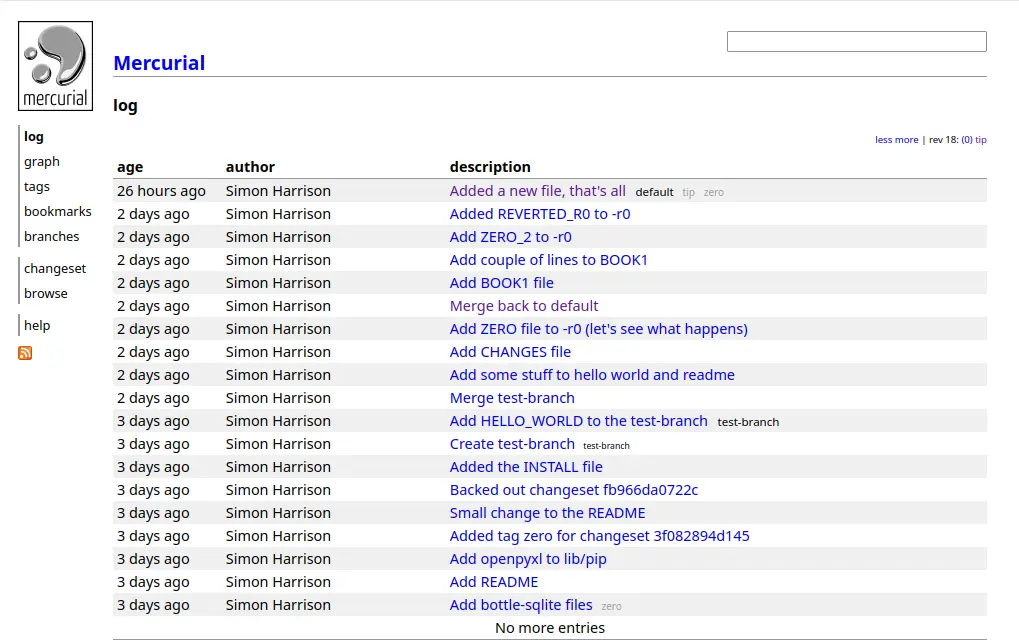
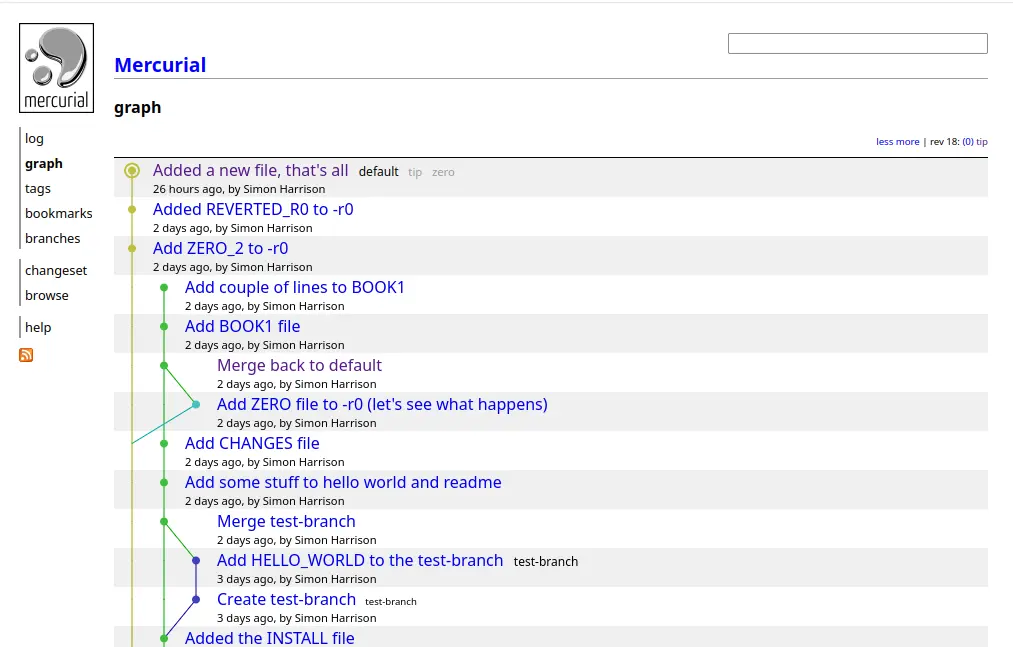
And you’ve now got a web interface to your repository.
Log view
Graph view
To be Continued…